- Produkt-Art
- LED-Monitor44Gaming Monitor36LCD-Monitor9Smart Monitor1
- Marke
- Samsung17Philips15Philips Monitore11Iiyama9Viewsonic9Dell8MSI8Asus6AOC5Gigabyte5Alienware3Acer2EIZO2LC Power2Lenovo2LG Electronics2ASRock1ODYS1Thermaltake1
- VerkäuferConrad Electronic SE
- Preis
- Nur ISO-zertifizierte Verkäufer
- Nein702Ja89
- Besonderheiten
- Curved-Display95Neigbar66Höhenverstellbar53Integrierte Lautsprecher46VESA Mount 100 x 100 mm43Flicker Free-Technologie40High Dynamic Range (HDR)34Kopfhöreranschluss33Schwenkbar33Kensington-Lock32Blaulicht-Reduktion29Freesync17AMD RADEON FreeSync14Ultra WQHD-Auflösung13USB-Dock10Integrierter KVM-Switch9Drehbar auf Hochformat7WQHD-Auflösung7Pivot-Funktion6Full HD-Auflösung5VESA DisplayHDR 4005Blaulicht-Filter4Ethernet-Anschluss4G-Sync3Betriebssystem Tizen2Bluetooth2Inkl. Fernbedienung2Integrierte Webcam2Integriertes Mikrofon2Samsung Smart-Features2Unterstützt Amazon Alexa2Unterstützt Bixby Voice Assistant2WiFi2Inkl. Netzwerkadapter1UHD-Auflösung1
- Schnittstellen
- DisplayPort66HDMI®65Kopfhörer (3.5 mm Klinke)25RJ4522USB-C®18Kopfhörer-Buchse17USB-A (USB 3.2 Gen 1)16USB-B11Audio-Line-out8USB-A (USB 3.1 Gen 1)5USB-C® (USB 3.2 Gen 1)5USB-C® 3.25Audio, stereo (3.5 mm Klinke)4HDMI® 2.0b4Thunderbolt 44USB-A (USB 2.0)4HDMI® 2.13USB-A3USB-A (USB 3.0)3USB-A (USB 3.2 Gen 2)3Audio-Line-in2Bluetooth®2Gigabit-LAN (1 Gbit/s)2Micro HDMI™2USB2USB-C® (USB 2.0)2WLAN2DVI1HDMI® Eingang1Mikrofon-Buchse1Mini DisplayPort1USB-C® (DP Alt Mode)1USB-C® (USB 3.2 Gen 2)1USB-C® PD1VGA1
- Anwendungsbereich
- Energieeffizienzklasse
- Display (Zoll)
- Bildformat
- Bildfrequenz / Verbesserung
- Display-Auflösungsmodus
- Reaktionszeit
- Panel-Technologie
- Auflösung (max.)
- Filialverfügbarkeit
- Refurbished & Angebote
Curved Pc Monitor
95 ErgebnisseIiyama G-Master Curved Red Eagle Gaming Monitor EEK F (A - G) 114.3 cm (45 Zoll) 5120 x 1440 Pixel 32:9 0.8 ms HDMI®, Di
Dell P3424WEB Conferencing LED-Monitor EEK F (A - G) 86.4 cm (34 Zoll) 3440 x 1440 Pixel 21:9 5 ms HDMI®, DisplayPort, R
Philips Monitore Brilliance P-line 499P9H LED-Monitor EEK G (A - G) 124 cm (48.8 Zoll) 5120 x 1440 Pixel 32:9 5 ms USB-A
Dell U4025QW Ultrasharp LED-Monitor EEK F (A - G) 100.8 cm (39.7 Zoll) 5120 x 2160 Pixel 21:9 5 ms HDMI®, DisplayPort, T
Viewsonic VG3419C-2 LED-Monitor EEK F (A - G) 86.4 cm (34 Zoll) 3440 x 1440 Pixel 21:9 3.5 ms DisplayPort, USB-B, USB-C®
Viewsonic VX3418C-2K LED-Monitor EEK F (A - G) 86.4 cm (34 Zoll) 3440 x 1440 Pixel 21:9 1 ms HDMI® 2.0b VA LED
Asus XG49VQ Gaming Monitor EEK G (A - G) 124.5 cm (49 Zoll) 3840 x 1080 Pixel 32:9 4 ms HDMI®, DisplayPort, USB, Kopfhör
Samsung Odyssey G5 C34G55TWWP LED-Monitor EEK G (A - G) 86.4 cm (34 Zoll) 3440 x 1440 Pixel 21:9 1 ms DisplayPort, HDMI®
Philips Monitore 346E2CUAE/00 LED-Monitor EEK F (A - G) 86.4 cm (34 Zoll) 3440 x 1440 Pixel 21:9 4 ms HDMI®, DisplayPort
Samsung ViewFinity S9 LS49C950UAU LED-Monitor EEK G (A - G) 124.5 cm (49 Zoll) 5120 x 1440 Pixel 32:9 5 ms DisplayPort,
Samsung Odyssey G5 LS27CG554EU Gaming Monitor EEK F (A - G) 68.6 cm (27 Zoll) 2560 x 1440 Pixel 16:9 1 ms DisplayPort, H

Samsung Essential S3 LS27D392GAUXEN Curved Monitor 68cm (27 Zoll)
Samsung Odyssey G5 LS32CG554EU Gaming Monitor EEK G (A - G) 81.3 cm (32 Zoll) 2560 x 1440 Pixel 16:9 1 ms DisplayPort, H
Iiyama ProLite XCB3494WQSU-B1 LED-Monitor EEK F (A - G) 86.4 cm (34 Zoll) 3440 x 1440 Pixel 21:9 0.4 ms DisplayPort VA L
Philips Monitore 49B2U5900CH/00 LED-Monitor EEK F (A - G) 124.5 cm (49 Zoll) 5120 x 1440 Pixel 16:9 4 ms HDMI®, DisplayP
AOC Pro-Line CU34P3CV LED-Monitor EEK G (A - G) 86.4 cm (34 Zoll) 3440 x 1440 Pixel 21:9 4 ms HDMI®, DisplayPort, Kopfhö
Philips Monitore 345B1C LCD-Monitor EEK G (A - G) 86.4 cm (34 Zoll) 3440 x 1440 Pixel 21:9 5 ms Kopfhörer-Buchse VA LED

Philips 34B2U6603CH LCD-Monitor EEK F (A - G) 86.4 cm (34 Zoll) 21:9 4 ms VA LCD
Dell Plus LCD-Monitor EEK F (A - G) 86.4 cm (34 Zoll) 3440 x 1440 Pixel 21:9 5 ms VA LCD
Viewsonic VA3820C LED-Monitor EEK F (A - G) 96.5 cm (38 Zoll) 3800 x 1600 Pixel 21:9 4.785 ms HDMI® 2.1, DisplayPort, US

Alienware DELL Alienware 34 Gaming Monitor AW3425DWM 86.36cm 34inch VA 3440x1440 21:9 400c Gaming Monitor EEK G (A - G)
Iiyama G-Master Red Eagle GCB3280QSU-B2 Gaming Monitor EEK F (A - G) 80 cm (31.5 Zoll) 2560 x 1440 Pixel 16:9 0.2 ms HDM
EIZO EV3895-BK LED-Monitor EEK E (A - G) 95.3 cm (37.5 Zoll) 3840 x 1600 Pixel 24:10 5 ms DisplayPort, HDMI®, USB-C®, US
Iiyama G-Master Curved ETE DQHD Gaming Monitor EEK F (A - G) 113 cm (44.5 Zoll) 5120 x 1440 Pixel 32:9 0.8 ms HDMI®, Dis
LC Power LC-M30UWFC Gaming Monitor EEK F (A - G) 74.9 cm (29.5 Zoll) 2560 x 1080 Pixel 21:9 1 ms DisplayPort, HDMI®, Kop
Viewsonic VA3420C-2 LED-Monitor EEK F (A - G) 86.4 cm (34 Zoll) 3440 x 1440 Pixel 21:9 3.5 ms HDMI® 2.1, DisplayPort, US

Asus VG27VQM TUF Gaming Gaming Monitor EEK E (A - G) 68.6 cm (27 Zoll) 1920 x 1080 Pixel 16:9 1 ms HDMI®, DisplayPort, U
Samsung Odyssey Ark S55CG970NU Smart Monitor EEK G (A - G) 139.7 cm (55 Zoll) 3840 x 2160 Pixel 16:9 1 ms DisplayPort, H
Samsung Odyssey G9 S49CG954EU Gaming Monitor EEK G (A - G) 124.5 cm (49 Zoll) 5120 x 1440 Pixel 32:9 1 ms DisplayPort, H
Samsung Odyssey G6 S32BG650EU LED-Monitor EEK F (A - G) 81.3 cm (32 Zoll) 2560 x 1440 Pixel 16:9 1 ms HDMI®, DisplayPort
Gigabyte GS32QCA Gaming Monitor EEK F (A - G) 80 cm (31.5 Zoll) 2560 x 1440 Pixel 16:9 1 ms DisplayPort, HDMI® VA LED
Philips Monitore 325E1C LCD-Monitor EEK G (A - G) 81.3 cm (32 Zoll) 2560 x 1440 Pixel 16:9 4 ms Audio-Line-out VA LED

Samsung S27C364EAU - S36C Series - LED-Monitor - gebogen - 68 cm (27")
ODYS XP32-X LED-Monitor EEK F (A - G) 81.3 cm (32 Zoll) 2560 x 1440 Pixel 16:9 1 ms HDMI® 2.1, DisplayPort, Kopfhörer (3
MSI MPG 491CQPXDE Gaming Monitor EEK G (A - G) 124.5 cm (49 Zoll) 5120 x 1440 Pixel 32:9 0.03 ms DisplayPort, HDMI® OLED
Iiyama GCB3482WQSU-B1 LED-Monitor EEK E (A - G) 86.4 cm (34 Zoll) 3440 x 1440 Pixel 21:9 0.6 ms DisplayPort VA LED
Alienware AW3425DW Gaming Monitor EEK F (A - G) 86.4 cm (34 Zoll) 3440 x 1440 Pixel 21:9 0.03 ms DisplayPort OLED
Iiyama XCB3497WQSNPH-B1 LED-Monitor EEK F (A - G) 86.4 cm (34 Zoll) 3440 x 1440 Pixel 21:9 0.4 ms Mikrofon-Buchse VA LED
Philips Monitore 346B1C LCD-Monitor EEK G (A - G) 86.4 cm (34 Zoll) 3440 x 1440 Pixel 21:9 5 ms RJ45, Kopfhörer-Buchse V
Gigabyte GS27QCA Gaming Monitor EEK F (A - G) 68.6 cm (27 Zoll) 2560 x 1440 Pixel 16:9 1 ms DisplayPort, HDMI® VA LED
Lenovo ThinkVision P49w-30 LED-Monitor EEK G (A - G) 124.5 cm (49 Zoll) 5120 x 1440 Pixel 32:9 6 ms HDMI®, DisplayPort,
Samsung Odyssey Neo G9 LS57CG954NU Gaming Monitor EEK G (A - G) 144.8 cm (57 Zoll) 7680 x 2160 Pixel 32:9 1 ms DisplayPo
Samsung ViewFinity S6 LS34C650TAU LED-Monitor EEK G (A - G) 86.4 cm (34 Zoll) 3440 x 1440 Pixel 21:9 5 ms DisplayPort, H
MSI MAG 341CQPDE QD-OLED Gaming Monitor EEK G (A - G) 86.9 cm (34.2 Zoll) 3440 x 1440 Pixel 16:9 0.03 ms HDMI®, DisplayP
LC Power LC-M39-QHD-165-C Gaming Monitor EEK G (A - G) 97.8 cm (38.5 Zoll) 2560 x 1440 Pixel 16:9 4 ms Audio, stereo (3.
Gigabyte G34WQC2 Gaming Monitor EEK G (A - G) 86.4 cm (34 Zoll) 3440 x 1440 Pixel 21:9 1 ms DisplayPort, HDMI® VA LED
EIZO EV3895-WT LED-Monitor EEK E (A - G) 95.3 cm (37.5 Zoll) 3840 x 1600 Pixel 24:10 5 ms DisplayPort, HDMI®, USB-C®, US
Lenovo ThinkVision P40w-20 LED-Monitor EEK G (A - G) 100.8 cm (39.7 Zoll) 5120 x 2160 Pixel 21:9 6 ms Thunderbolt 4, HDM

Samsung S27D364GAU - S36GD Series - LED-Monitor - gebogen - 68.6 cm (27"")
Philips Monitore 40B1U6903CH/00 LED-Monitor EEK G (A - G) 100.8 cm (39.7 Zoll) 5120 x 2160 Pixel 16:9 4 ms HDMI®, Displa

Samsung Odyssey OLED G9 S49DG910SU G91SD Series OLED-Monitor Gaming Curved 124,5 cm 49 Zoll 5120 x 1440 Dual Quad HD @
Philips Monitore 241E1SC/00 LED-Monitor EEK F (A - G) 61 cm (24 Zoll) 1920 x 1080 Pixel 16:9 4 ms HDMI®, VGA, Audio-Line
Philips Monitore 34B1U5600CH/00 LED-Monitor EEK G (A - G) 86.4 cm (34 Zoll) 3440 x 1440 Pixel 16:9 4 ms HDMI®, DisplayPo
Philips Monitore 346P1CRH LCD-Monitor EEK G (A - G) 86.4 cm (34 Zoll) 3440 x 1440 Pixel 21:9 4 ms RJ45, Kopfhörer-Buchse
Asus ROG Strix XG34WCDG Gaming Monitor EEK F (A - G) 86.4 cm (34 Zoll) 3440 x 1440 Pixel 21:9 0.03 ms OLED
MSI MPG 346CQRFDE X24 Gaming Monitor EEK F (A - G) 86.4 cm (34 Zoll) 3440 x 1440 Pixel 21:9 0.5 ms HDMI®, DisplayPort, U
Samsung Odyssey OLED G9 S49CG954SU Gaming Monitor EEK G (A - G) 124.5 cm (49 Zoll) 5120 x 1440 Pixel 32:9 0.03 ms Mini D
MSI Pro MP341CQWDE LED-Monitor EEK G (A - G) 86.4 cm (34 Zoll) 3440 x 1440 Pixel 21:9 4 ms DVI, HDMI® 2.0b, DisplayPort,
AOC Value-Line CU34V5C/BK LED-Monitor EEK G (A - G) 86.4 cm (34 Zoll) 3440 x 1440 Pixel 21:9 4 ms HDMI®, DisplayPort, US

Dell UltraSharp U4924DW - LED-Monitor - gebogen - 124.46 cm (49")5120 x 1440 5K
Viewsonic VX2719-PC-MHD Gaming Monitor EEK F (A - G) 68.6 cm (27 Zoll) 1920 x 1080 Pixel 16:9 1 ms DisplayPort, HDMI®, K
Philips Monitore 45B1U6900C/00 LED-Monitor EEK G (A - G) 114.3 cm (45 Zoll) 5120 x 1440 Pixel 16:9 4 ms HDMI®, DisplayPo
AOC Value-Line CU34V5CW/BK LED-Monitor EEK G (A - G) 86.4 cm (34 Zoll) 3440 x 1440 Pixel 21:9 4 ms HDMI®, DisplayPort, U

Acer Vero CB343CUR Dbemiiphcuzx CB3 Series LED-Monitor Curved 86,4 cm 34" 3440 x 1440 UWQHD @ 60 Hz IPS 300 cd/m²
MSI 9S6-3CE31T-014 Gaming Monitor EEK F (A - G) 68.6 cm (27 Zoll) 2560 x 1440 Pixel 16:9 0.5 ms HDMI® 2.0b, DisplayPort,
Viewsonic VX2418C Gaming Monitor EEK F (A - G) 59.9 cm (23.6 Zoll) 1920 x 1080 Pixel 16:9 1 ms HDMI®, DisplayPort VA LED
Philips 27M2C5201L Gaming Monitor EEK E (A - G) 68.6 cm (27 Zoll) 1920 x 1080 Pixel 16:9 1 ms DisplayPort, HDMI® VA LCD
ASRock PG27QRT2A Gaming Monitor EEK F (A - G) 68.6 cm (27 Zoll) 2560 x 1440 Pixel 16:9 1 ms HDMI®, DisplayPort, Kopfhöre
Asus ROG Strix XG27WCS Gaming Monitor EEK E (A - G) 68.6 cm (27 Zoll) 2560 x 1440 Pixel 16:9 1 ms DisplayPort, HDMI®, Ko
Iiyama G-MASTER Red Eagle GB2766HSU-B1 Gaming Monitor EEK E (A - G) 68.6 cm (27 Zoll) 1920 x 1080 Pixel 16:9 1 ms HDMI®,

Samsung S24D364GAU - S36GD Series - LED-Monitor - gebogen - 61 cm (24")
Iiyama G-MASTER Gaming Monitor EEK F (A - G) 86.4 cm (34 Zoll) 3440 x 1440 Pixel 21:9 0.4 ms
MSI MAG 275CQFDE E18 Gaming Monitor EEK F (A - G) 68.6 cm (27 Zoll) 2560 x 1440 Pixel 16:9 0.5 ms DisplayPort, HDMI® Rap
Iiyama GCB3484WQSU-B1 LED-Monitor EEK F (A - G) 86.4 cm (34 Zoll) 3440 x 1440 Pixel 21:9 0.4 ms DisplayPort VA LED
AOC CU34P2A LED-Monitor EEK G (A - G) 86.4 cm (34 Zoll) 3440 x 1440 Pixel 21:9 1 ms HDMI®, DisplayPort, USB-A (USB 3.2 G

LG Electronics LG 45GS95QX-B TFT-Monitor 113cm (44,5 Zoll), Grau
Asus TUF Gaming VG32VQM5B Gaming Monitor EEK E (A - G) 80 cm (31.5 Zoll) 1920 x 1080 Pixel 16:9 0.5 ms VA LCD

GIGABYTE GS27FC2 68,58cm 27Zoll SS VA Edge monitor 1920x1080 FHD 350cd/m2 240Hz 2xHDMI 2.0 1xDP 1.4
MSI Modern MD342CQPWDE LED-Monitor EEK F (A - G) 86.4 cm (34 Zoll) 3440 x 1440 Pixel 21:9 4 ms HDMI®, DisplayPort, USB-A
Viewsonic VG3419C LED-Monitor EEK G (A - G) 86.4 cm (34 Zoll) 3440 x 1440 Pixel 16:9 3.5 ms HDMI®, DisplayPort, Audio, s

Samsung Monitor S36GD (LS24D360GAUXEN)

24 inch Nitro ED240QS3bmiipx Curved/180Hz/1ms monitor
Viewsonic VP3881A LED-Monitor EEK G (A - G) 96.5 cm (38 Zoll) 3840 x 1600 Pixel 21:9 5 ms DisplayPort, HDMI®, Kopfhörer
Dell UltraSharp U3423WE LCD-Monitor EEK F (A - G) 86.4 cm (34 Zoll) 3440 x 1440 Pixel 21:9 5 ms HDMI®, DisplayPort, USB-
Asus TUF Gaming VG34WQML5A LED-Monitor EEK F (A - G) 86.4 cm (34 Zoll) 3440 x 1440 Pixel 21:9 1 ms VA LED

Philips Evnia 3000 32M2C3500L - LED-Monitor - Gaming - gebogen - 81.3 cm (32")

Alienware DELL Alienware 32 Gaming Monitor AW3225DM 79.94cm 31.5inch VA 2560x1440 16:9 400 Gaming Monitor EEK G (A - G)

MSI MAG 242C computer monitor Displays Monitore
Ratgeber
Früher waren ausladende Röhrenbildschirme der Standard, wenn es um PC-Monitore ging. Dann wurden sie von Flachbildschirmen vollständig ersetzt. Seitdem sind wir es gewohnt, auf flache Bildschirme zu schauen. Curved-Monitore sind eine neuere Alternative, die große Vorteile gegenüber „normalen“ Displays bietet. In unserem Ratgeber erfahren Sie, welche das sind und worauf beim Kauf zu achten ist.
Herkömmliche Flachbildschirme tragen ihre Bezeichnung, weil sie sehr dünn sind und ein flaches Display haben. Im Gegensatz dazu sind Curved-Monitore nach innen (konkav) gewölbt. Man blickt also nicht auf ein flaches, sondern in der Mitte gekrümmtes Bild. Auf dem Endverbrauchermarkt sind solche Geräte in den 2010er-Jahren erschienen. Gekrümmte Monitore hat es aber schon vorher gegeben. Bereits in den 1950ern entwickelte die Firma Cinerama das gleichnamige Filmformat mit einem Seitenverhältnis von 2,685:1, bei dem drei synchron laufende Projektoren auf eine gewölbte Leinwand ausgerichtet sind.
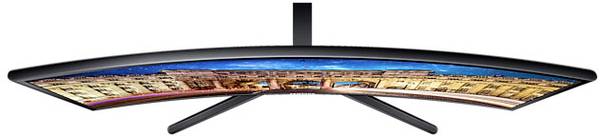
Wie stark ein Monitor gekrümmt ist, gibt der Wölbungsradius an. Erhältlich sind Modelle mit einer Wölbung von 1500R oder 1800R, aber auch mit 3000R. "R" steht für Radius, während der Zahlenwert als Millimeterangabe zu verstehen ist. Grundsätzlich gilt: Je kleiner ein Monitor, desto kleiner ist der Wölbungsradius. Andernfalls würde die Krümmung dazu führen, dass das Bild so aussieht, als sei es verzerrt. Der Wert weist auch auf den empfohlenen Sitzabstand hin. Hat ein Monitor einen Wölbungsradius von beispielsweise 1800R, sollte man 1,8 Meter davon entfernt sitzen, um den idealen Blickwinkel auf das Display zu haben.
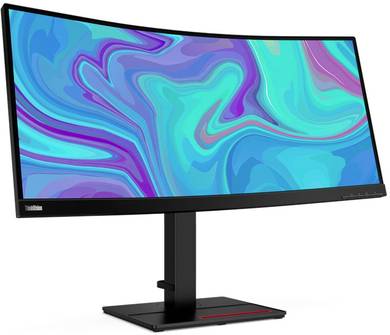
Die Idee hinter Curved-Monitoren ist simpel: Das menschliche Auge ist gekrümmt, weswegen es viel angenehmer ist, auf ein gewölbtes Bild zu schauen, wenn man längere Zeit arbeitet oder spielt.
Die Krümmung des menschlichen Auges entspricht einem Wölbungsradius von etwa 1000R. Das Sichtfeld ist nach vorne gewölbt und geht über die Seiten hinaus (Stichwort: peripheres Sehen). Mit einem flachen Bildschirm lässt sich dieser Umstand nicht effektiv nutzen, mit einem Curved-Monitor hingegen schon.
Dadurch, dass die Panel-Form der natürlichen Augenkrümmung nachempfunden ist, sind Curved-Bildschirme augenschonender als flache Bildschirme.
Des Weiteren nimmt man das Bild weniger verzerrt beziehungsweise weniger verschwommen wahr, weil der linke und rechte Rand des Monitors in die periphere Sicht hineinragen und näher an den Augen sind. Da so ein größerer Teil des Sichtfelds abgedeckt wird, erscheint das Bild größer und es kommt ein Panoramaeffekt zustande.
Gerade beim Gaming ist das von Vorteil, weil man sich noch tiefer in die virtuelle Welt hineingezogen fühlt. Zwar werden Curved PC-Monitore häufig als Gaming-Monitore angeboten, aber auch bei der Arbeit erweist sich ein Display mit Krümmung als äußerst praktisch.
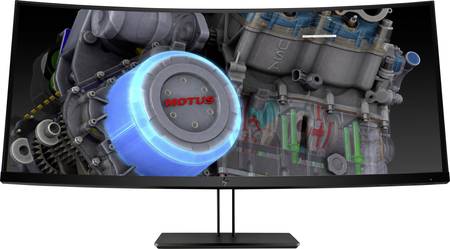
Curved-Monitore gibt es wie Flachbildschirme in diversen Größen und mit unterschiedlichen Auflösungen. Da wären etwa Modelle mit einem Seitenverhältnis von 16:9, darunter Exemplare mit der immer noch gängigen Full-HD-Auflösung von 1920x1080 Pixeln.
Es geht aber deutlich hochauflösender als Full HD – und breiter. So werden nicht nur Curved-Monitore mit WQHD-Auflösung (2560x1440) und 4K beziehungsweise UHD-Auflösung (Ultra HD) angeboten, sondern auch Ultrawide-Bildschirme, beispielsweise mit UWQHD-Auflösung (3440x1440).
Mit einem Seitenverhältnis von 21:9 ist so ein Bildschirm ein idealer Gaming-Monitor. Aufgrund des gebogenen Panels und der Breite wird die Immersion beim Spielen nochmals verstärkt. Für grafisch anspruchsvollere Spiele bedarf es aber eines leistungsstarken Gaming-PCs, denn die UWQHD-Auflösung stellt kaum geringere Anforderungen an die Hardware als 4K.
Wie bei Flachbildschirmen stellt sich auch beim Kauf eines Curved-Displays zuerst die Frage, wie viel Zoll und welche Auflösung es haben soll. Die Entscheidung sollten Sie davon abhängig machen, wie viel Platz Sie auf dem Schreibtisch haben, aus welcher Distanz Sie auf den Monitor schauen, wie viel Leistung Ihr PC bietet (eine höhere Auflösung bedarf mehr Hardware-Power, Full HD ist wiederum sehr genügsam) und wie viel Geld Sie bereit sind, für Ihren neuen Monitor auszugeben. Des Weiteren spielt der Wölbungsradius eine wichtige Rolle. Je größer er ausfällt, desto weiter sollten Sie vom Bildschirm entfernt sitzen, damit Sie den perfekten Blickwinkel haben.
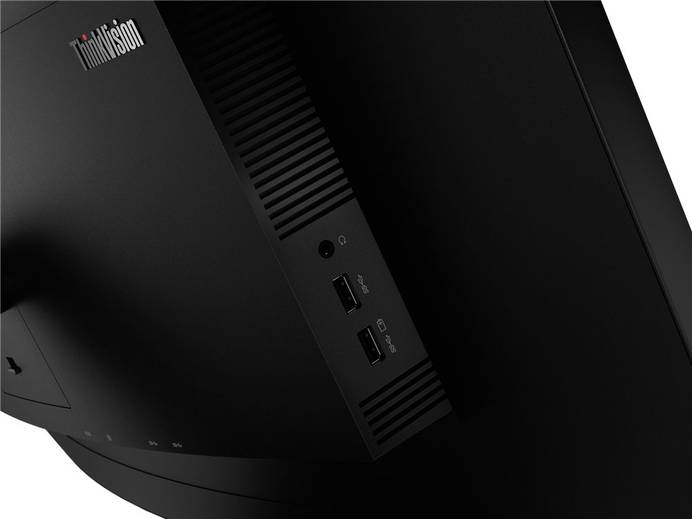
Auch die Anschlüsse spielen eine Rolle, wobei die meisten Monitore sowohl einen HDMI- als auch DisplayPort-Eingang haben. Einen Curved-PC-Monitor mit älterem DVI- oder VGA-Anschluss werden Sie kaum finden. Das ist aber nicht tragisch, da die PCs von heute (selbst solche ohne dedizierte Grafikkarte) auf jeden Fall über HDMI und/oder DisplayPort verfügen. Entscheiden Sie sich für einen Monitor mit hoher Auflösung, ist HDMI oder DisplayPort ohnehin unerlässlich, weil sonst gar kein Bild im Qualitätssegment von UWQHD oder UHD angezeigt werden könnte. Im Fall eines Curved Gaming-Monitors ist DisplayPort als Schnittstelle zu bevorzugen, sofern der PC ebenso damit ausgestattet ist, da diese Schnittstelle eine schnellere Übertragungsgeschwindigkeit bietet als HDMI, was ein ruckelfreies Spielen ermöglicht. Aktuell liegt die Datenrate von HDMI bei 43 GB/s, bei DisplayPort beträgt sie 77 GB/s.
Des Weiteren sollten Sie in Ihre Kaufentscheidung einbeziehen, ob der Monitor Features wie HDR, Nvidia G-Sync oder AMD FreeSync unterstützt, die gerade für Gamer interessant sind. Ein Gaming-Monitor muss auf jeden Fall eine der beiden Arten adaptiver Bildsynchronisation aufweisen, damit sich die Grafikkarte nicht an die Frequenz des Bildschirms anpassen muss, was Performance-Verluste zur Folge hätte. Zu guter Letzt ist auch auf Anpassungsmöglichkeiten zu achten. Ist der Monitor höhenverstellbar? Lässt er sich schwenken? Je mehr Individualisierungsoptionen vorhanden sind, desto besser.
Beim Kauf eines Curved-Monitors fürs Home Office oder Büro ist auf Features wie eine Flicker-Free-Technologie und eine einstellbare Helligkeit zu achten. Ersteres ist vor allem bei Backlight-LED-Monitoren, also LC-Displays mit einer flächig angeordneten LED-Hintergrundbeleuchtung empfehlenswert, da solche Bildschirme zum Flimmern neigen. Eine Flicker-Free-Technologie reduziert das Flackern und ermöglicht auf diese Weise ein augenschonenderes Arbeiten. In hellen Arbeitsumgebungen spielt die maximale Helligkeit des Bildschirms eine Rolle. Ist der Monitor zu dunkel, führt das dazu, dass man in einer hellen Umgebung nichts darauf erkennen kann. Die Helligkeit sollte sich daher höher stellen lassen.
Wer früher ein besonders breites Bild beim Spielen haben wollte, musste sich mehrere Monitore kaufen und das Spiel auf allen Geräten anzeigen lassen. Das Problem dabei: Das Bild ist wegen der Monitorrahmen unterbrochen. Ein Gaming-Monitor im Ultra-Wide-Curved-Format ist in dem Fall die perfekte Lösung, da kein Rahmen mitten im Bild stört. Dank der Krümmung entsteht ein Panoramaeffekt, der es noch leichter macht, in Spielwelten einzutauchen und die reale Umgebung auszublenden.
Eignen sich Curved-Bildschirme für Setups mit zwei oder mehr Monitoren?
Zwei Curved-Monitore nebeneinander aufzustellen, ist weniger sinnvoll, denn aufgrund der Krümmung würden die Rahmen nicht bündig aneinander liegen. Allerdings können Sie zwei Bildschirme vertikal anordnen, also quasi übereinander stapeln. Haben beide das gleiche Format (gleiche Größe und Krümmung), ergeben sie eine Einheit.
Lässt sich ein Curved-Monitor hochkant nutzen?
Ein Curved-Monitor ist nicht dafür geeignet, hochkant genutzt zu werden. Die Krümmung hat ja den Zweck, größeren Nutzen aus dem peripheren Sehen zu ziehen. Wenn aber nicht der linke und rechte Rand näher am Auge sind, sondern der obere und untere, bringt das herzlich wenig. Deshalb haben gewölbte Monitore auch keine Pivot-Funktion.
Was ist besser: ein Curved Gaming-Monitor mit IPS-Panel oder VA-Panel?
Beim Kauf eines Curved-Monitors fürs Gaming ist ein LC-Display mit IPS-Panel zu bevorzugen. Die Technologie ist moderner und ermöglicht schnelle Reaktionszeiten, was bei raschen Bildwechseln relevant ist. Displays mit VA-Panel bieten zwar gute Kontrastwerte und sind günstiger, können mit den Vorteilen von IPS-Panels aber nicht mithalten.